Every date for every boat, on one board.
Inspections, crew credentials and drills for your whole fleet, with what’s due next and the regulation behind it. Start from the spreadsheet you already keep. Your crews never log in.
30 days free. No card. Built by Capt. Karynn Marchal, USCG Master Unlimited.
See the whole fleet in one look
One row per boat and one per crew member. Each date is colored by how soon it’s due, so the overdue ones find you first.
Add a towing vessel and its inspection calendar comes with it: COI, annual inspection or TPO survey, TSMS audit, drydock, documentation, FCC license, fire and lifesaving equipment. Each item comes with its interval or expiry and the regulation it comes from. Enter the last date and RegKnot works out the next.
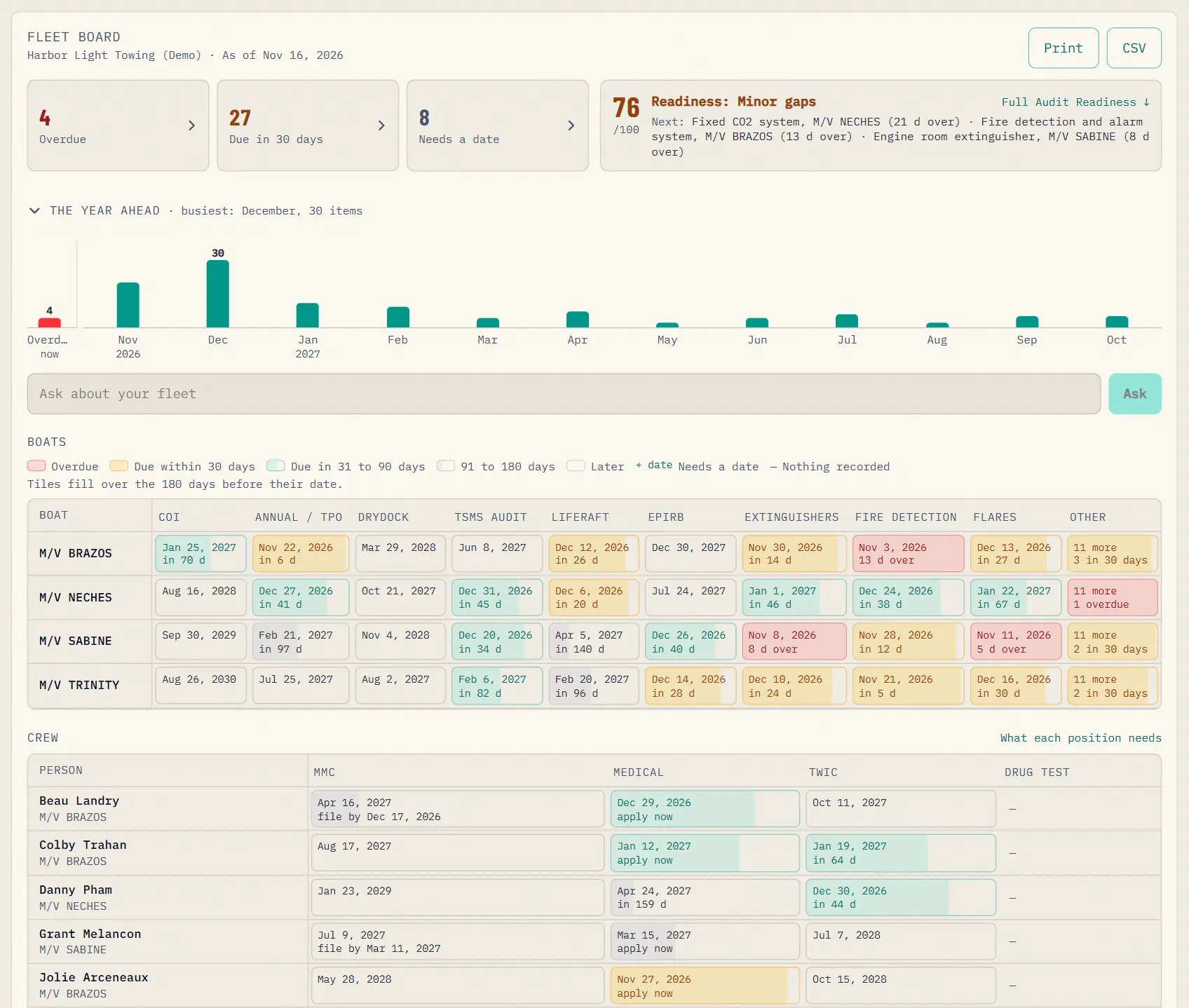
Overdue: what has already passed its date.
Due in 30 days: what to schedule this month.
Needs a date: items on a boat’s list that nobody has dated yet.
Readiness score: one number for the fleet, with the reason it isn’t higher.
The year ahead: how many items come due each month, so the busy months don’t surprise you.
Print it on your letterhead or take it as a spreadsheet.
Every crew member’s papers, kept by the office
MMCs, medical certificates, TWICs, STCW endorsements and drug tests for everyone on your boats.
What each position needs.
Tell RegKnot which credentials you expect a captain, a mate or a deckhand to hold. A missing or expiring one shows on the board.
Time to renew.
Reminders 6 months out, 3 months out, and on the date to file by.
Sea service letters.
46 CFR 10.232 letters from each boat’s crew list and rotation, on your letterhead.
No crew accounts.
The office keeps the records.
Start from the files you already have
Drop your folder.
Drag in the folder the office already keeps: crew spreadsheets, equipment lists, COIs, your TSMS. RegKnot sorts it and shows you what it found before anything is saved. Changed your mind? Undo for 24 hours.
Import your spreadsheet.
Your crew and equipment spreadsheets load as they are. You don’t have to reformat them.
Add a boat from its COI.
Take a photo of the Certificate of Inspection and RegKnot reads the boat’s details and the expiry date.
Know what’s due without opening a spreadsheet
Monday email.
What’s overdue, due this week and due in the next 30 days, every Monday morning.
Everything due.
One list across the fleet: overdue, the next 90 days, the next 6 months. Filter by boat, person or type.
Reminders by email.
Before each inspection and piece of equipment comes due.
In your own calendar.
One link puts every date in Outlook, Google Calendar or Apple Calendar, and keeps it current.
Ready when someone asks to see it
Audit packet.
One PDF per boat: its particulars, the log, recurring items and nonconformities, for the period you choose.
Drill and training records.
Log each drill, orientation and safety meeting, with the signed sheet attached as a photo or PDF.
Nonconformity tracker.
Each finding with its owner, due date, what was done about it, and the evidence that closed it.
Fleet Audit Readiness report.
A plain-language read of where the fleet stands and what an auditor would ask about first.
Checklists for your boat.
Port state control, COI inspection and TSMS audit checklists built for each vessel, each item with its regulation.
Ask a question, get the section
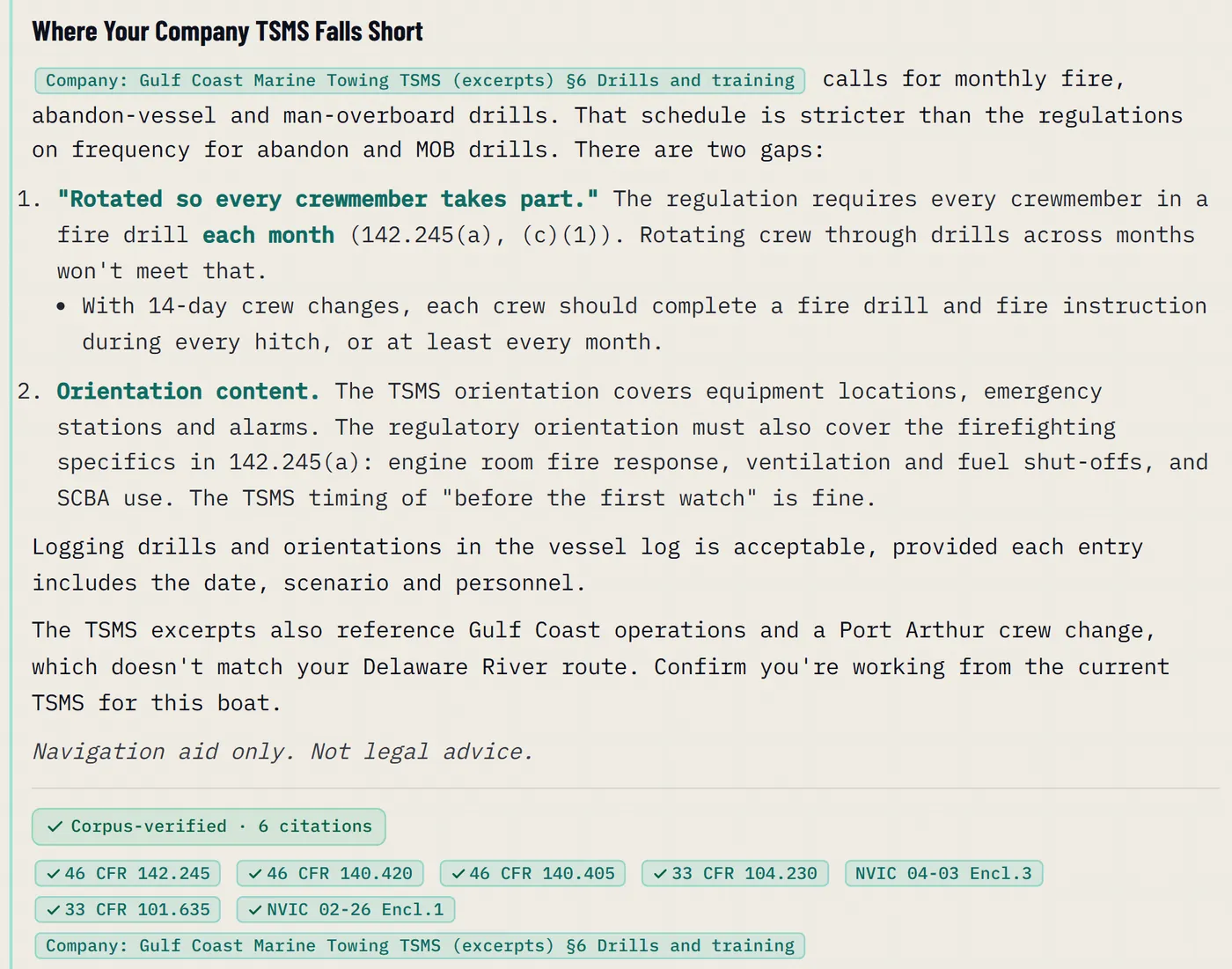
Ask in plain English. The answer cites the regulation it comes from, and you can open the text. When your own TSMS covers the question, the answer cites that too, by section.
Covers Subchapter M, the rest of 46 and 33 CFR, Coast Guard policy, and OSHA’s rules for the shore side.
Who built it, and how your records are kept
- Built by Capt. Karynn Marchal, USCG Master Unlimited.
- Two-step sign-in, and your office can require it for everyone.
- Your records, documents and backups are stored on encrypted volumes, with encrypted copies kept offsite.
- Your company’s documents are never mixed into the regulation library other customers search.
- Security plans are refused at upload, marked or not. They don’t belong in a tool like this.
- Asking because of the Coast Guard’s cybersecurity rule (33 CFR part 101, subpart F)? See how RegKnot handles sign-in, encryption and access.
One flat price by boat count
| Plan | Boats | Monthly | Yearly |
|---|---|---|---|
| Office S | Up to 5 | $199 | $1,990 |
| Office M | Up to 10 | $299 | $2,990 |
| Office L | Up to 20 | $399 | $3,990 |
No per-seat or per-crew charge. Five office logins included. Crew records are unlimited. Pay yearly and two months are free. More than 20 boats? Talk to us.
Questions
- Do our crews have to log in?
- No. On the office plan the office keeps everything, and crews need no accounts. If you want crews to log entries and ask questions themselves, there is a plan with crew logins.
- Can you load it for us?
- Yes. Email your crew and equipment spreadsheets to hello@regknots.com and we’ll load them into your trial and tell you when it’s ready. Or use the “Send us your spreadsheet” button on this page to book a time with us.
- How long does setup take?
- Most offices add their boats and load a crew spreadsheet in one sitting. The slow part is finding the last date for each inspection; you can fill those in over time, and the board shows what still needs one.
- What happens at day 30?
- When the trial ends without a card or an invoice set up, the Wheelhouse becomes read-only for everyone but its owner until one is. 30 days after that it is archived. Nothing is deleted, and support can restore it.
- Can we pay by invoice?
- Yes. Ask and we’ll bill you by invoice, net 30.
- Does it replace our maintenance or dispatch software?
- No. RegKnot keeps compliance records and dates: inspections, crew credentials, drills, nonconformities, and the answers behind them. It doesn’t do work orders, parts, engine hours, dispatch or billing. Your dates and records export as spreadsheets, so they can sit beside whatever you use for those.
- Does it cover passenger vessels?
- Yes, small passenger vessels under Subchapter T: the inspection calendar, the drill starter list, the inspection records packet, crew records, the due list and cited answers all work for them.
- Can we get our data out?
- Yes. Everything due, the fleet board, each boat’s equipment list and each boat’s log export as spreadsheets, and the audit packet is a PDF. If you ever need a complete copy, ask and we’ll send it.